Keyboard Shortcuts
There are numerous keyboard shortcuts available in Boats Animator; here is a comprehensive list of all of them.
Note for macOS users
The Command key should be used in place of any shortcuts listed with Ctrl in them.
| Action | Primary | Alternative |
|---|---|---|
| Capture frame | Ctrl 1 |
Enter |
| Undo last frame | Ctrl Z |
* |
| Delete current selected frame | Delete |
Backspace |
| Toggle audio | Ctrl M |
|
| Play / pause playback | Space |
0 |
| Short play | P |
. |
| Toggle playback looping | 8 |
|
| Live view | L |
3 |
| Display first frame | Ctrl Left |
|
| Display last frame | Ctrl Right |
|
| Display previous frame | Left |
1 |
| Display next frame | Right |
2 |
| Toggle grid overlay | 4 |
|
| Toggle aspect ratio mask | 5 |
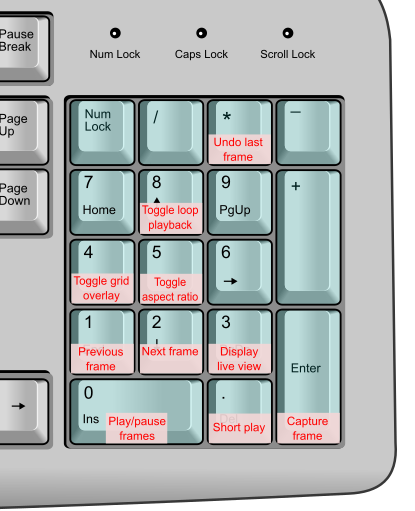
Shortcuts on a numeric keypad
Boats Animator's shortcuts have been chosen so that the most common can be accessed using a numeric keypad: